
Annotations and Bookmarks
Choose Annotations in the reader toolbar to see your highlights, notes, and bookmarks. Use Show to filter the list.
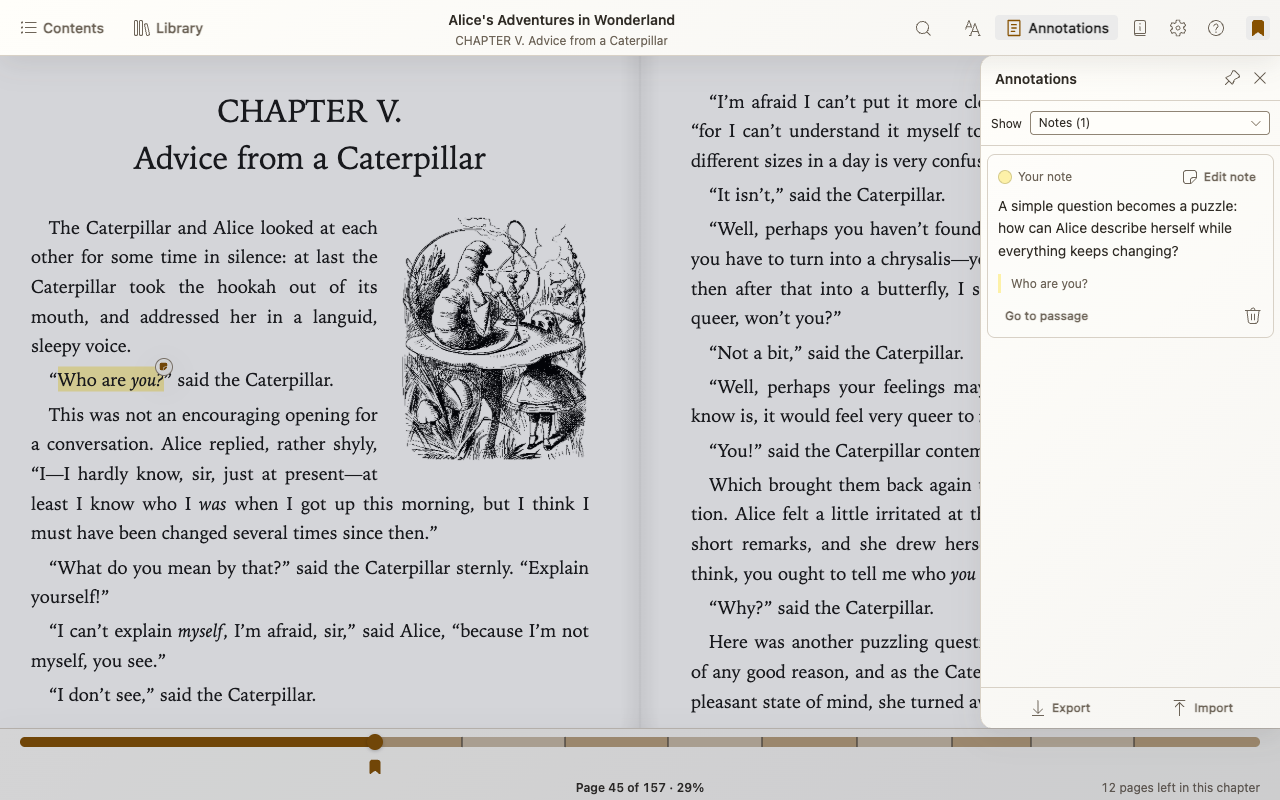
Save and revisit a bookmark
Click the toolbar’s bookmark button or press Mod+B to bookmark your current position. Use it again to remove the bookmark. Mod means Command on Mac or Control elsewhere.
Choose Annotations → Show → Bookmarks to revisit or remove saved places. Bookmark flags on the progress bar also jump to saved places.
Bookmarks supplied with the book have a Publisher note tag and cannot be deleted.
Highlight text and add a note
- Select a passage in the book.
- Choose a highlight color or underline, or Add note to highlight and write a note together.
- Choose Save when your note is ready.
Open a highlight to edit or delete it, or find it in Annotations. Go to passage takes you back to its location. Save note edits before leaving the reader.
Export or import annotations
Choose Export in Annotations to back up or share your highlights, notes, bookmarks, and labels as an EPUB Annotations 1.0 JSON file.
Choose Import to load a compatible JSON file. Use the same book or edition for best results; compatibility varies between tools. Unsupported locations and detected duplicates are skipped.